


Shopify merchants are under more pressure than ever to make their offers stand out. Good products alone are often not enough, especially when shoppers expect more flexibility and a smoother path to purchase. A well-designed mix-and-match bundle can help solve both problems at once. It gives customers more choice while giving merchants a practical way to lift average order value.
But not every bundle app is built for that job. Some are better for quick quantity-based offers, while others are designed for full build-your-own bundle journeys. If the shopper is configuring one product rather than assembling a bundle, compare this with our Shopify product options app study. If the real question is volume discounts, free gifts, or BOGO campaigns, see our data study on the best Shopify discount apps. This guide focuses on mix-and-match bundles, with a closer look at what each app does well, where it feels limited, and which type of store it is most likely to suit. Let's get started!
What Makes a Good Mix-and-Match Bundle App?
After looking across these apps side by side, we do not think the best one is simply the one with the longest feature list. In practice, the strongest mix-and-match bundle apps are those that make the offer easy to build, shop for, and manage once orders start coming in.
- Clear bundle logic: We always start by examining how the app handles product grouping, selection rules, and the bundle structure, because these shape the customer experience from the start.
- Flexible pricing: A good app should give merchants room to run the offer their way, whether that means fixed bundle pricing, percentage discounts, tiered savings, or a simple mix-and-match setup with no discount at all.
- A storefront experience that fits the brand: Some apps work better as lightweight widgets, while others are much stronger when the bundle lives on its own dedicated page. So the right choice often comes down to how polished or guided you want the journey to feel.
- Reliable backend handling: From our perspective, this is where weaker apps usually get exposed. If variant selection, inventory sync, cart behavior, or checkout handling feels shaky, the bundle may look good on the surface but still create operational headaches behind the scenes.
With those 4 criteria in mind, the quick comparison below makes it much easier to see which app is actually built for your kind of store.
Quick Comparison: Best Shopify Mix and Match Bundle Apps
| App name | Rating & review (April 2026) | Key mix-n-match features | Limitations | Pricing plans |
|---|---|---|---|---|
| BOGOS | 5.0★ (3,500+) | multi-step flow, product grouping, min/max per step, tiered discounts, multiple discount types, real-time preview | overkill for simple use cases, setup can feel complex | free plan available, paid from ~$29.99 -> $109.99/month |
| Fast Bundle | 5.0★ (2,390+) | section-based mix & match, multi-step setup, tiered pricing, flexible cart display, bundle as product | less advanced promo logic, more product-centric than campaign-driven | from ~$19 -> $139/month, free dev plan |
| Bundler | 4.9★ (2,050+) | flexible selection, min/max rules, variant-level mix, simple discount logic, shortcode & page placement | basic UI, no guided flow, limited UX polish | free plan available, paid from ~$9.99 -> $19.99/month |
| BundleSuite | 5.0★ (310+) | multi-step bundle builder, dedicated bundle page, strict selection rules, tiered pricing, dynamic/fixed pricing | requires more setup, less lightweight for quick offers | from ~$12.99 -> $39.99/month, free dev plan |
| Mix & Match Bundle Builder | 4.9★ (100+) | product grouping, flexible layouts, min/max rules, dynamic pricing, real-time summary, free gift logic | less customizable for complex flows, UI needs careful setup | pricing not clearly tiered publicly (mid-range app) |
| MOD Bundles | 5.0★ (20+) | bundle as product, variant selection, simple pricing rules, free gift, native theme integration | no guided flow, limited advanced promo logic, free plan very limited | free plan (1 bundle), paid tiers scale with usage |
6 Proven Apps for Building Mix and Match Bundles
#1 BOGOS: Free Gift Bundle Upsell
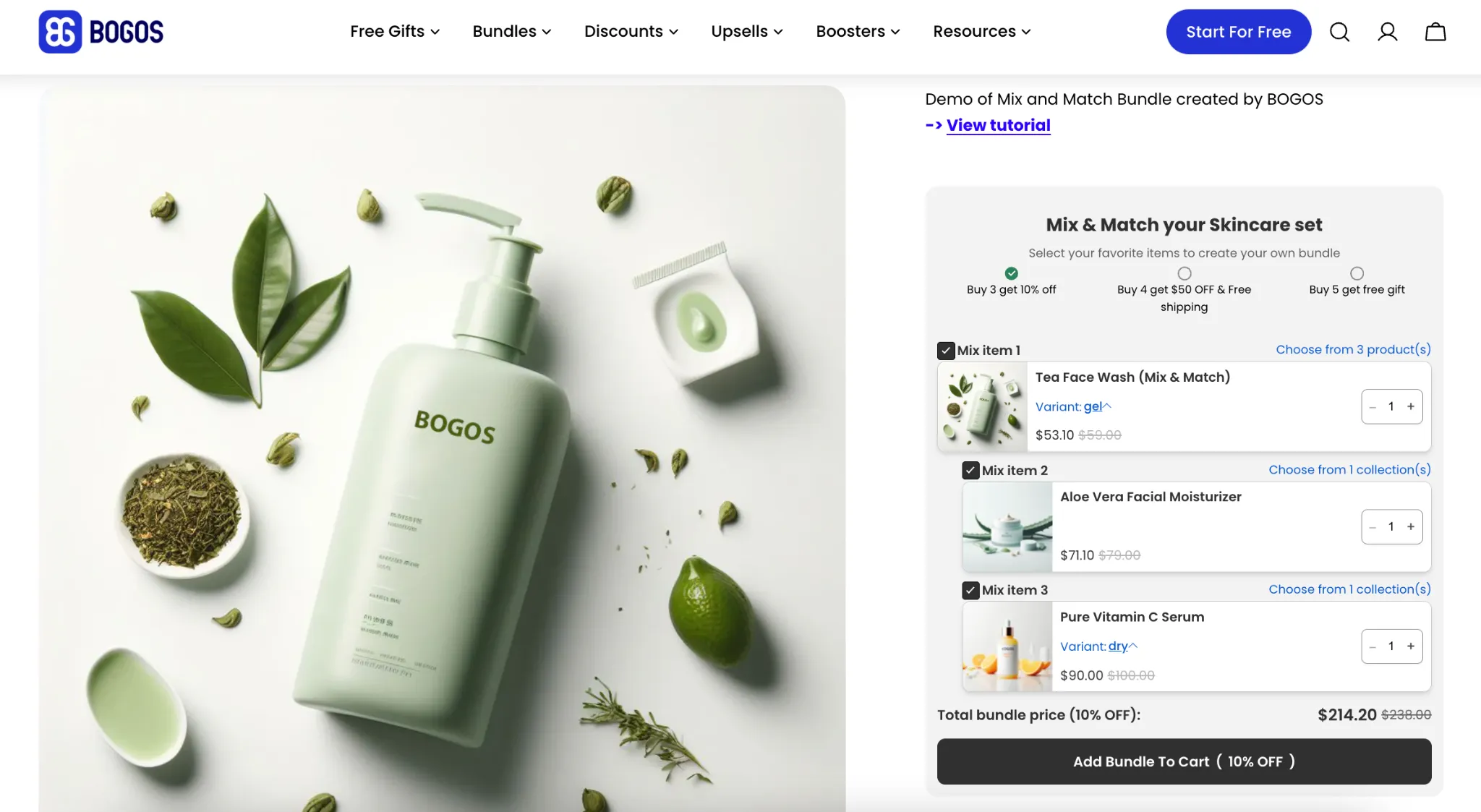
If you want your mix-and-match bundles to drive a broader promotional strategy, BOGOS definitely fits the bill. It goes far beyond a bare bones selection widget. Instead, this app is built for merchants running full-fledged campaigns, like seasonal gifting or targeted offers.
The mix-and-match experience here feels highly guided and campaign-driven. What really sets it apart is how smoothly it does the heavy lifting. It combines core bundle logic with advanced merchandising tactics, enabling you to easily stack promotions without breaking your storefront.
Key mix and match bundle features:
- Flexible step setup: Let customers mix and match their bundle with a clear selection flow, including quantity and variant options for each item.
- Set minimum requirements for each item: Control how many products shoppers must choose before they can continue.
- Tiered discount setup: Set up tiered discounts to motivate higher quantities.
- Choose from four discount types: Percentage, fixed amount, fixed price, or free gift.
- Combine with shipping discounts for added value: Layer incentives into the same offer.
- Intuitive and fully customizable widget: An intuitive, user-friendly interface for a higher conversion rate.
- Showcase tiered discounts with two display options: Present incentives in the format that fits your storefront best.
- Fully customize layout, text, colors, and display: Adapt the experience to your brand and campaign needs.
- Advanced sub-conditions: Target by specific URLs, customer order history, tags, location, or market.
- Inventory sync and reporting: Ensure accurate inventory management with automatic synchronization, including product variants, and access real-time analytics for performance monitoring and optimization.
Other features:
- Free gift offers with auto-add free gift to cart or shopper choice via pop-up.
- BOGO and BXGY campaigns with auto-add-to-cart support.
- Check out upsells, thank you page upsells, and frequently bought together blocks.
- Volume discounts, quantity breaks, and rules for the cheapest or most expensive item.
- Progress bars, campaign widgets, scheduling, and advanced targeting by customer tag, market, location, or order history.
In general, if your store only needs a very simple, straightforward mix-and-match widget, the sheer depth of this app's promotional logic might be more firepower than you actually need right out of the box.
#2 FBP | Fast Bundle Product
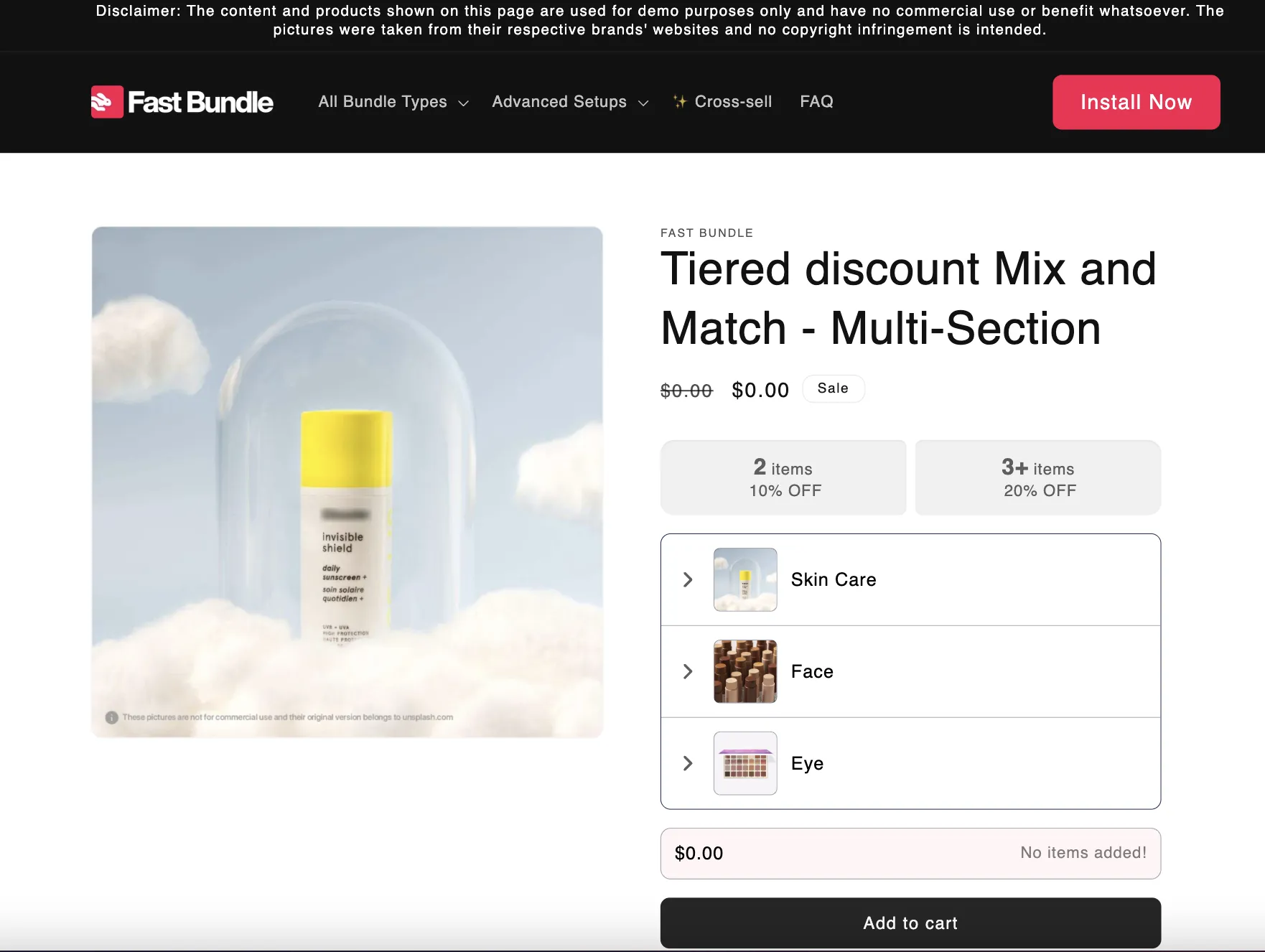
For stores that want a highly structured mix-and-match experience that blends naturally into their theme, Fast Bundle hits the sweet spot. The experience here feels heavily product-led rather than promotion-led.
As a result, it is ideal for brands that want their bundles to look and behave like a core part of the shopping journey. What makes this app a standout choice is its incredible operational flexibility. It gives you tight control over exactly how the bundle is presented, split, and managed across your product pages, your checkout flow, and even your POS system.
Key mix and match bundle features:
- Section-based mix-and-match flow: Build the offer with multiple sections, each acting as a separate product group.
- Multi-step bundle setup: Support more guided bundle creation by combining multiple sections into a single flow.
- Tiered discount logic: Support single-discount offers or buy-more, save-more pricing structures.
- Flexible cart display: Show the bundle as a single line item or split it into individual products in the cart, at checkout, and in orders.
- Bundle product page support: Create the bundle as its own product page, with the option to disable that setup if needed.
- Basic merchandising controls: Edit bundle title, subtitle, description, and on-page product presentation.
Other features:
- Fixed bundles, add-on bundles, volume discounts, and quantity break offers.
- Frequently bought together blocks, add-ons, and bundle-based upsells.
- BXGY campaigns use discount-based or bundle-based logic.
- Subscription support for bundle offers that include subscription products.
We think Fast Bundle makes the most sense for merchants who are comfortable with a section-based setup and do not need the most editorial, highly curated bundle journey. In this mix-and-match flow, the discount logic appears more straightforward, so stores looking for more layered promotional combinations may find it less expressive than BOGOS. It is powerful, but it also asks you to think a bit more about how the bundle should behave as a product rather than just an offer.
#3 Bundler - Product Bundles App
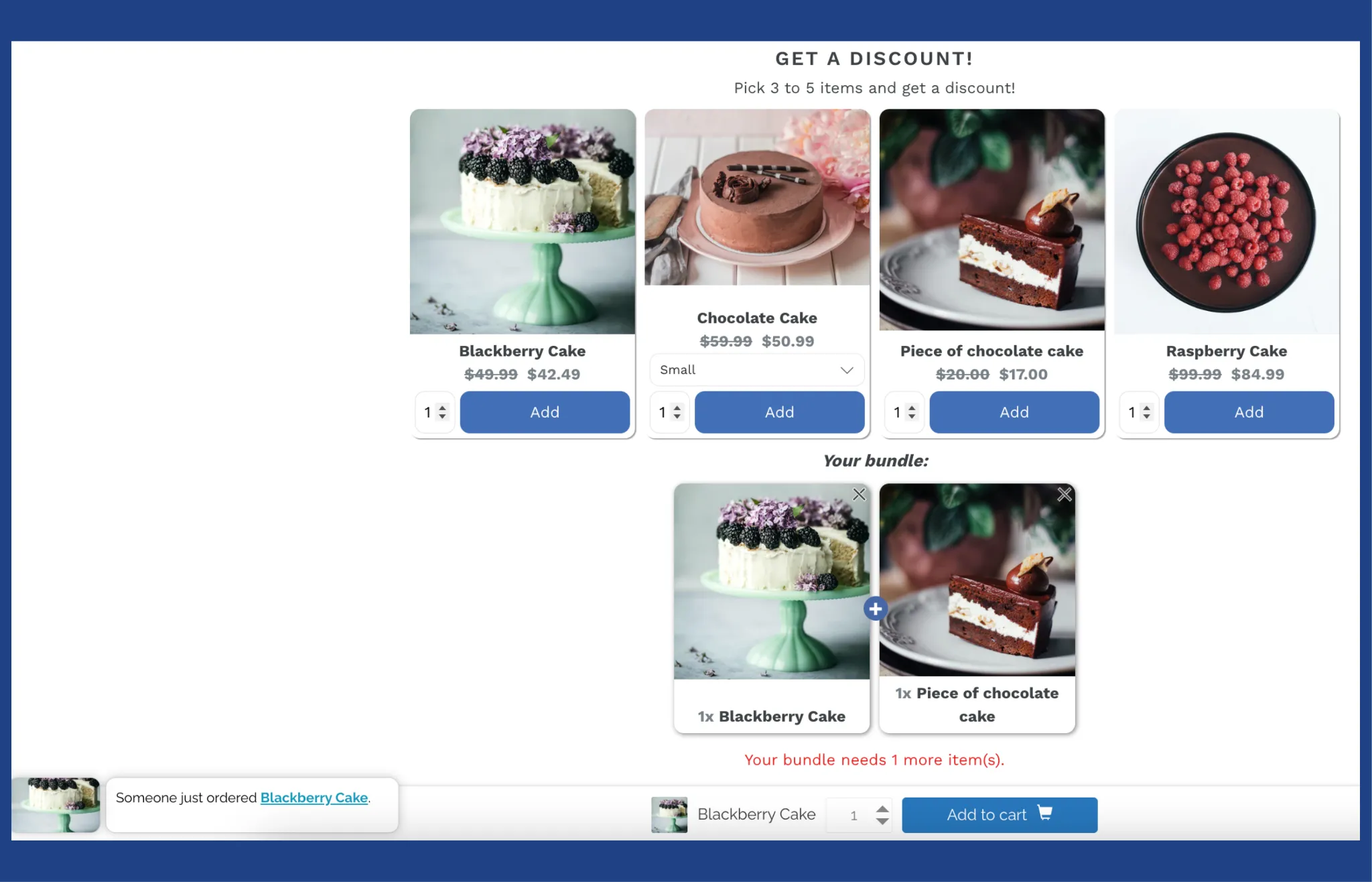
When you need an affordable, no-nonsense way to get mix-and-match bundles off the ground, Bundler is a rock-solid option. You will not have to navigate a steep learning curve to see results.
The experience is highly practical and straightforward. This makes it the go-to app for merchants who care more about getting a functional offer live quickly than designing a hyper-curated journey.
What really puts Bundler on the map is the sheer amount of functionality it hands to budget-conscious stores. You get flexible placement, variant mixing, and discount stacking before you ever need to consider paying for a premium builder.
Key mix and match bundle features:
- Flexible item selection: Let customers pick products freely inside the bundle while you set minimum and maximum quantity rules.
- Simple discount setup: Support percentage discounts, fixed amount discounts, fixed bundle pricing, or no discount at all for a pure mix-and-match offer.
- Condition-based logic: Apply the offer only when shoppers reach the required item count or include specific products.
- Flexible placement: Show bundles on product pages and support bundle landing pages and shortcode-style placement on other pages.
- Variant-level support: Build bundles at the product or variant level, which is useful when shoppers need to mix sizes, colors, or other options.
- Basic widget customization: Edit the title, description, CTA, price display, and visual styling of the bundle widget.
Other features:
- Discount stacking with product discounts, order discounts, and shipping discounts.
- Subscription and pre-order support for recurring bundle offers.
- Quantity breaks, tiered discounts, and classic bundles beyond mix-and-match.
We treat Bundler as a highly functional tool rather than a premium guided builder. While we like how reliably its core mechanics work, it does not offer the highly polished aesthetic found in more expensive apps. We also recommend testing your cart thoroughly before launching if your store carries an exceptionally high variant count.
#4 BundleSuite Bundle Builder
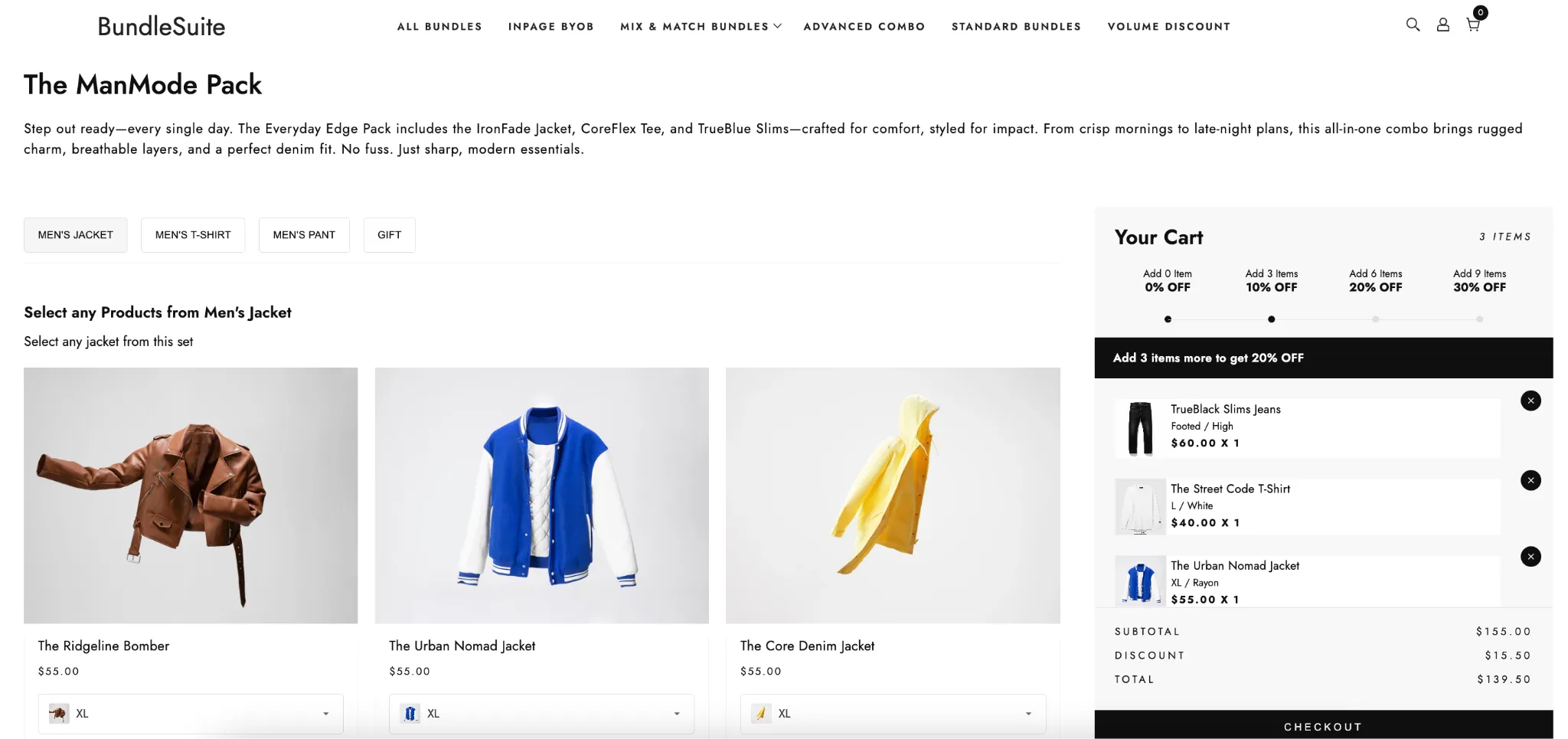
BundleSuite feels closer to a proper bundle storefront than a simple bundle widget. Compared with Bundler, it is far more polished and guided. Compared with BOGOS, it puts less weight on layered promotions and more focus on the bundle journey itself. That is exactly where it earns its place. If your goal is to let shoppers build a box that feels intentional, clean, and easy to follow, this app is hard to ignore.
Key mix and match bundle features:
- Dedicated bundle page: Gives each bundle its own page, which works well for BYOB flows and more deliberate shopping journeys.
- Multi-step structure: Lets you organize products into sets and guide shoppers through the bundle one step at a time.
- Selection rules: Supports min and max limits, optional open selection, and strict validation before the bundle can be added to the cart.
- Flexible discount setup: Supports percentage discounts, fixed amount discounts, fixed prices, and per-item pricing logic.
- Tiered pricing logic: Lets you build discount tiers based on quantity or purchase amount.
- Dynamic or fixed bundle pricing: Works for both fixed-price boxes and more flexible mix-and-match pricing models.
Other features:
- Real-time inventory sync with original SKUs, without creating duplicate bundle SKUs
- Prebuilt templates and simple layout customization tools.
- BOGO, quantity breaks, and gift style bundle promotions.
We think BundleSuite is strongest when the bundle itself is a key part of the shopping experience, not just a quick add-on. If you only want a lightweight widget dropped into an existing product page, this can feel like more setup than necessary.
We would also say it works best when you are happy to guide the shopper through a more structured path, rather than a fast, low-friction pop-up flow.
#5 Mix and Match Bundle Builder
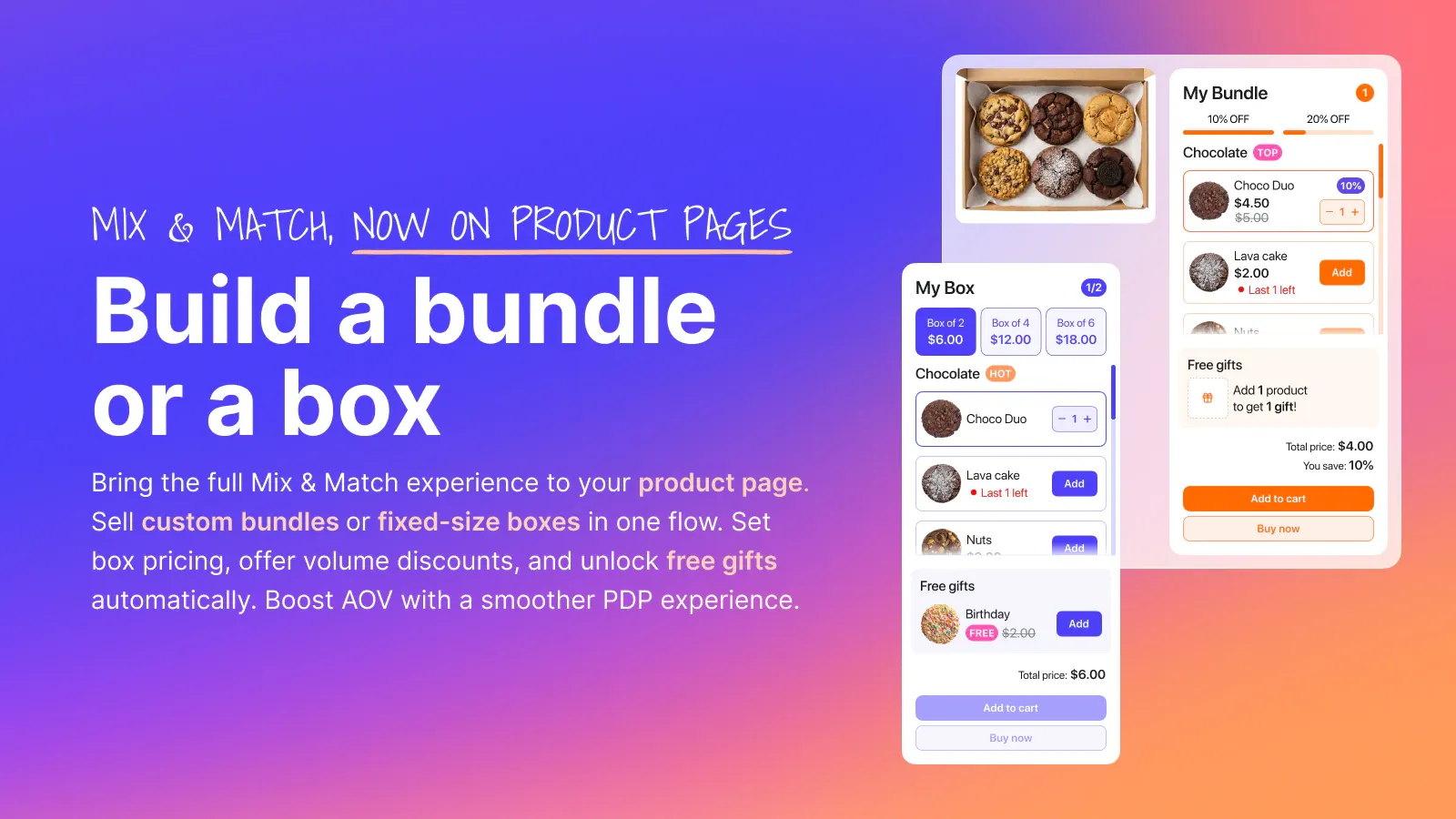
This app makes a strong first impression because it feels built around completion rather than just selection. The whole setup is geared toward helping shoppers move through the bundle with less friction and more momentum.
Instead of dropping a plain widget onto the page, it gives you a more guided mix-and-match flow with clear grouping, live pricing feedback, and built-in nudges that keep the offer moving forward.
Key mix and match bundle features:
- Flexible layouts: Support both a compact inline block and a more expanded layout with a dedicated summary panel.
- Product grouping: Lets you organize products into sections and control how items appear within each group.
- Quantity rules: Allows either open-ended selection or min and max quantity requirements for the bundle.
- Dynamic pricing: Uses the sum of selected products by default, with options for percentage, quantity-based, and order-value discounts.
- Free gift logic: Lets you unlock gifts based on bundle conditions, such as item count or cart value.
- Real-time summary: Shows selected items, pricing, discounts, and gifts as the shopper builds the bundle.
Other features:
- Product page placement and full page bundle setup.
- Progress bar, unlock messaging, and incentive badges.
- Low stock messaging to add urgency.
- Add-ons, frequently bought together blocks, and upsell popups.
- Conversion tracking and sales performance insights.
We think this app works best when you want a conversion-focused mix-and-match flow with clear shopper guidance. If your brand needs a highly editorial bundle journey or very deep rule-building across many steps, the setup may feel a bit more streamlined than a bespoke one. We would also spend time carefully testing the layout, because this kind of progress-driven experience only works when the grouping and messaging feel clean on your storefront.
#6 MOD Bundles
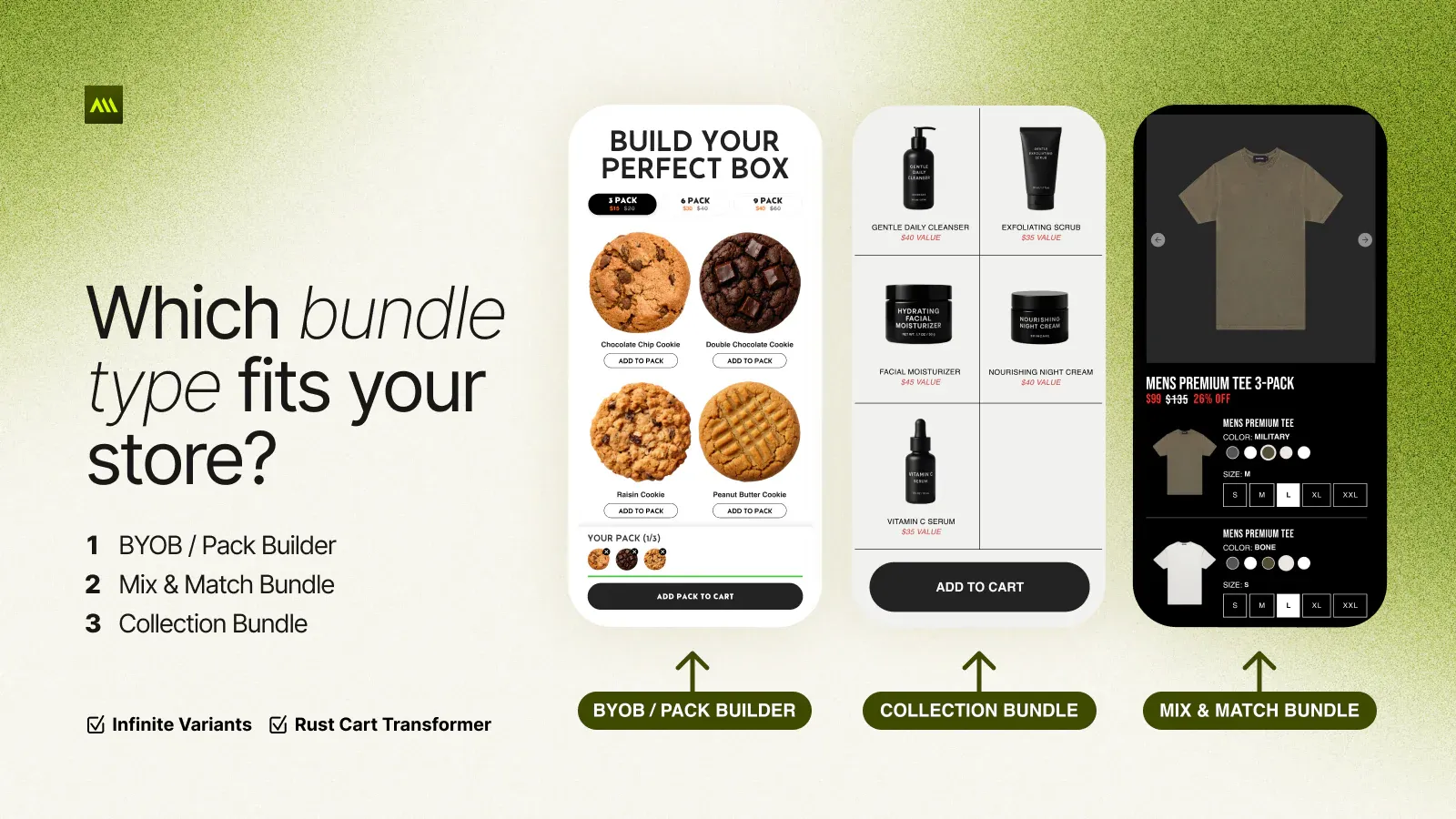
MOD Bundles feels very product-first in the best sense. Instead of treating a mix-and-match bundle as a temporary promo layer, you can build it as a real Shopify product with its own page, content, and merchandising space.
That makes the app especially appealing if you want your bundle to look polished, searchable, and fully integrated with the rest of your catalog, rather than tucked away in a small widget.
Key mix and match bundle features:
- Bundle as product: Each bundle is created as its own Shopify product, complete with a dedicated product page.
- Flexible product selection: You can add published products, with or without variants, then search for, browse, and reorder them manually in the bundle setup.
- Variant support: Shoppers can choose variants such as size or color for each item in the bundle.
- Discount configuration: The app supports no discount, percentage off, fixed amount off, and fixed bundle pricing.
- Free gift support: You can include a free product as part of the bundle offer.
- Native storefront setup: MOD Bundles works through Shopify product pages and OS 2.0 app blocks, so the bundle can slot into your theme without custom development.
Other features:
- Infinite variant bundles and build-your-own pack flows for more complex bundle setups.
- Real-time inventory sync to help prevent overselling.
- Volume discounts, quantity breaks, and dynamic pricing options.
- Performance optimization with a focus on Web Core Vitals.
We think the MOD Bundles app is strongest when you want bundles to live as proper products in your store, not just as lightweight add-ons. If you prefer a quick widget first setup on existing product pages, its product-led approach may feel a little less immediate.
We would also keep an eye on pricing tiers, because the free plan includes only one bundle product, so growing stores may outgrow it fairly quickly.
Which Shopify Mix and Match Bundle App Is Right for You?
The right app fit matters more than feature count. To avoid information overload, use this quick guide below:
- BOGOS: Best if you want the most complete option for mix and match bundles, free gifts, and promotion-driven campaigns.
- Fast Bundle: Best for a structured, product-led bundle flow on your storefront.
- Bundler: Best for budget-friendly mix and match offers with solid core logic.
- BundleSuite: Best for a more guided build-your-own bundle journey.
- Mix and Match Bundle Builder: Best for conversion-focused flows with progress cues and live summaries.
- MOD Bundles: Best if you want each bundle to live as its own Shopify product page.
If nothing else, we hope this roundup helps you narrow the field and choose a mix-and-match bundle app with more confidence!
FAQs: Shopify Mix and Match Bundle Apps
Can Shopify create mix-and-match bundles natively?
No. Native Shopify bundle functionality is better suited to fixed bundles, so merchants usually turn to apps like BOGOS, Fast Bundle, or BundleSuite for true Shopify mix-and-match bundles.
Which Shopify bundle app is best for mix-and-match bundles with promotions?
BOGOS is one of the strongest options if you want mix-and-match bundles to work alongside free gifts, BXGY offers, and other campaign-style promotions.
Do Shopify mix-and-match bundle apps work with subscriptions?
Yes. Some Shopify bundle apps do support subscription-based offers. For example, Bundler supports subscriptions and pre-orders, while Fast Bundle also supports bundles that include subscription products.
Are Shopify mix-and-match bundle apps expensive?
No. Pricing usually starts at free or around $9.99-$19 per month for lower tiers, while more advanced plans in this category can cost roughly $109.99-$139 per month.
Find Shopify Clients Worth Your Time
Search by niche, traffic, and tech stack. Export with verified founder contacts.Search stores by niche, traffic, and tech stack. Export with verified founder contacts so you can skip the research.
![Best Shopify Dropshipping Apps 2026 [1.36M]](/_next/image?url=%2Fimages%2Fblog%2Fbest-shopify-dropshipping-apps.webp&w=3840&q=75&dpl=dpl_243MpgewibF6bPW6xsa1HUph3j5x)